Online Passport & Visa Photo Maker
Crop and format your photo to exact government millimeter and pixel dimensions. Validated against official ICAO Doc 9303, ISO/IEC 19794-5, and embassy standards.
Upload Your Photo
Drag & drop or browse from your device. Supports JPG, PNG, and WebP.
100% Compliant
Exact ratios for US, Canada, UK, Schengen & 195+ nations.
Zero Feature Alteration
Preserves natural facial identity per strict consular rules.
Digital & Print Ready
Instant digital download + 4×6″ printable photo template.
How to Take a Passport Photo at Home (Step-by-Step)
Taking a passport photo at home means using your smartphone or digital camera to capture a compliant passport or visa photo without visiting a pharmacy or photo studio. With proper lighting and our AI compliance tool, home-taken photos are indistinguishable from professional studio photos.
Quick Summary
Taking a passport photo at home means using your smartphone or digital camera to capture a compliant passport or visa photo without visiting a pharmacy or photo studio. With proper lighting and our AI compliance tool, home-taken photos are indistinguishable from professional studio photos. Use PhotoResizer.us to check compliance for free and download a guaranteed-compliant photo for $4.99 — 70% cheaper than CVS or Walgreens.
Key Facts — US Visa Photo Requirements
What Is How to Take a Passport Photo at Home (Step-by-Step)?
Not sure if your photo passes?
Upload it now for a free, instant 14-point AI compliance check — no sign-up required.
Why Does Photo Compliance Matter for Your Visa?
How Do I Fix My Photo for This Requirement?
Stand 4 feet from a plain white wall with even lighting (face a window for natural light).
Have someone photograph you at eye level, or use a timer with your phone on a tripod.
Upload the photo to PhotoResizer.us for instant AI validation.
Fix any issues automatically and download the compliant result.
Ready to apply these steps?
Upload your photo and let our AI fix all compliance issues automatically in under 30 seconds.
People Also Ask
Can I take my own passport photo at home?
Yes. Use a smartphone camera, stand against a white wall, and ensure even lighting. Upload to our AI tool to verify compliance and fix any issues automatically.
What background do I need for a home passport photo?
A plain white or off-white wall works. Avoid patterned wallpaper. Our AI can replace imperfect backgrounds with compliant pure white.
How It Works
Get your compliant visa photo in under 30 seconds. No studio visit needed.
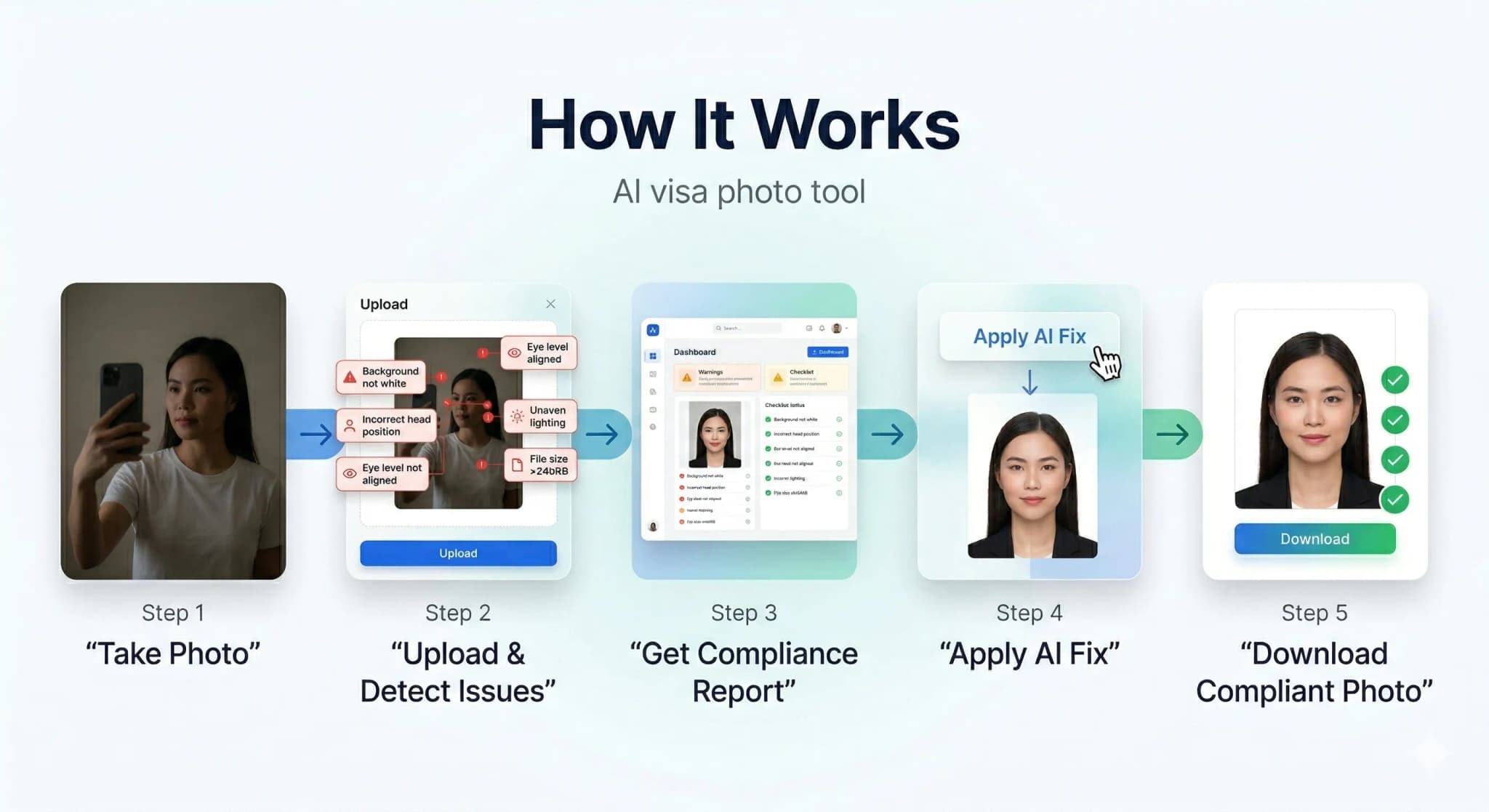
Upload or Snap
Upload any photo or use your camera. Our AI works with selfies, casual shots — anything.
AI Auto-Correction
Background removal, face centering, lighting fix, size compliance — all done by AI in seconds.
Download & Submit
Get your compliant photo instantly. Digital + print-ready formats available.
See the AI Difference
Our AI automatically corrects background, lighting, alignment, and sizing to meet strict government requirements.
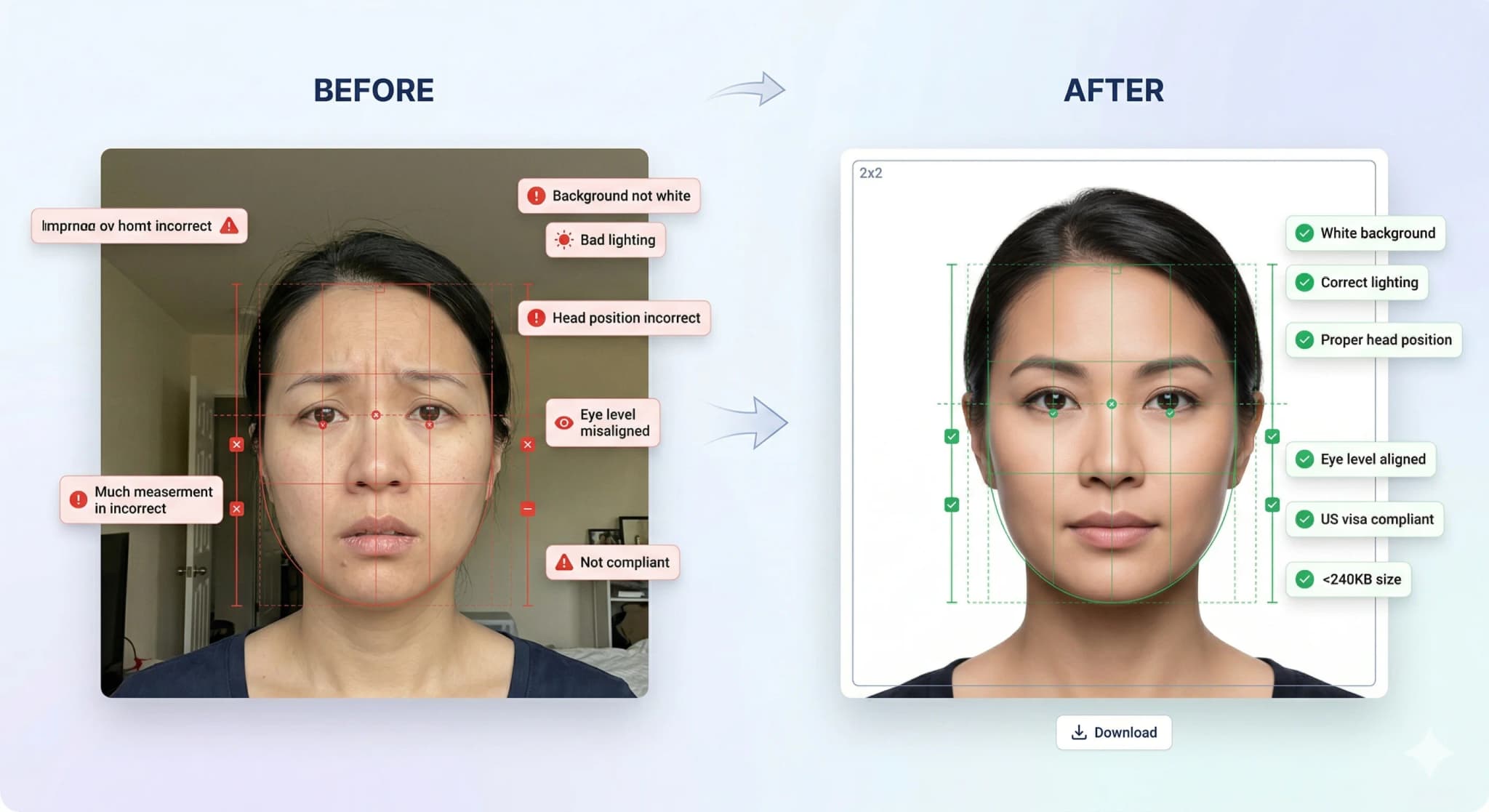
Background Removal
Pure white background
Head Straightening
Corrects tilt & rotation
Lighting Fix
Even, balanced exposure
Smart Crop
Perfect face positioning
Accepted vs Rejected Photos
30% of visa applications are delayed due to non-compliant photos. Don't be one of them.
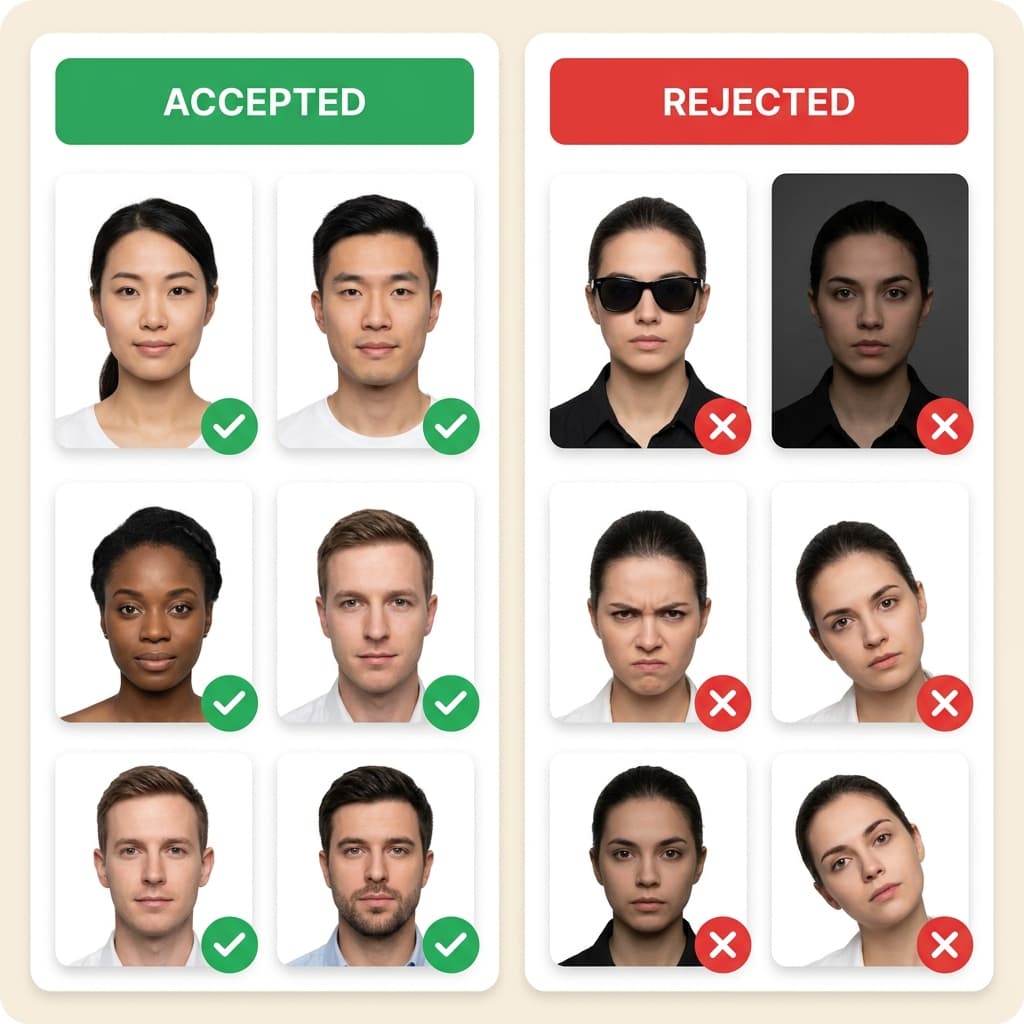
Top Rejection Reasons
- ✗ Wrong background color (not pure white)
- ✗ Wearing eyeglasses or glare on lenses
- ✗ Head tilted or turned off-center
- ✗ Wrong photo millimeter dimensions
Our AI Guarantees
- Pure white background every time
- Auto head straightening & centering
- Exact size per country specs
- 14-point compliance check
...
Photos processed today
99.7%
Acceptance rate
< 30s
Average processing time
4.8/5
Customer rating
Trusted by Thousands
“Used this for my DS-160 application. Photo was accepted first try! Much cheaper than going to Walgreens.”
Sarah M.
US Passport
“The AI fixed my background and lighting perfectly. Saved me a trip to the photo studio during busy season.”
Raj P.
UK Visa
“I was worried about the strict requirements but this tool handled everything. Got my visa approved!”
Emily C.
Schengen Visa
“Quick and easy. The compliance report gave me confidence that my photo would be accepted.”
David K.
Canada PR
Ready to Get Your Compliant Photo?
Join 500,000+ users who got their visa photos right the first time. It takes less than 30 seconds.
Frequently Asked Questions
What lighting is best for passport photos at home?
Can I use a selfie as a passport photo?
Related US Visa Photo Topics
Explore Further
Ready to fix your photo?
Join 500,000+ applicants who secured their visa photos with our AI. It takes less than 30 seconds.