State Dept. Compliant

Meets official 22 CFR 51.26 photographic standards

Biometric Ratio Verified

Guarantees 50%–69% chin-to-crown head proportion

Renewal & New Apps Ready

Prepares digital sRGB JPEG and 4×6″ printable sheets

Initializing AI Studio...

Simple 3-Step Process

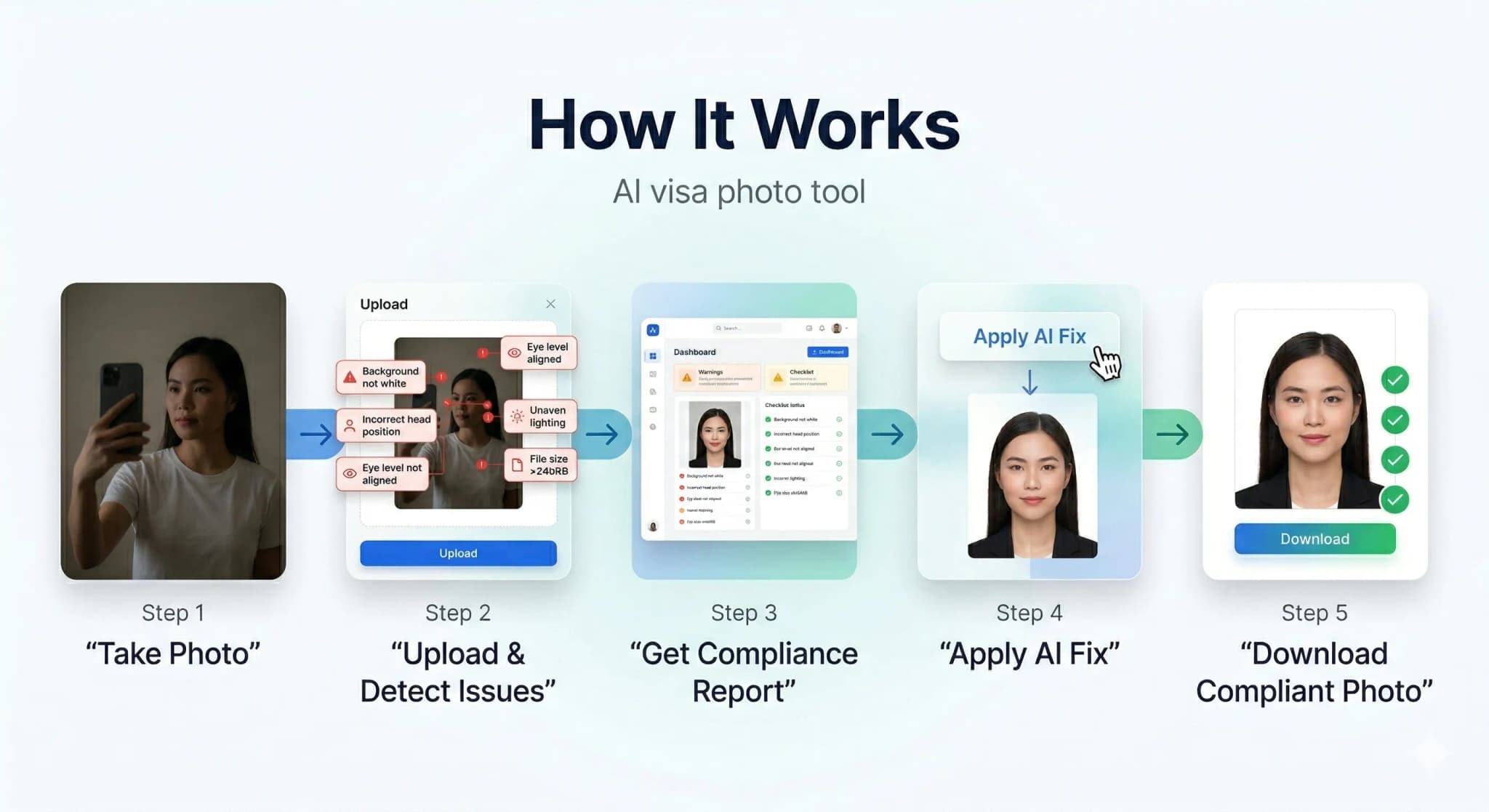
How It Works

Get your compliant visa photo in under 30 seconds. No studio visit needed.

How PhotoResizer works: 1) Take Photo 2) AI Fixes 3) Download
1

Upload or Snap

Upload any photo or use your camera. Our AI works with selfies, casual shots — anything.

2

AI Auto-Correction

Background removal, face centering, lighting fix, size compliance — all done by AI in seconds.

3

Download & Submit

Get your compliant photo instantly. Digital + print-ready formats available.

AI-Powered Results

See the AI Difference

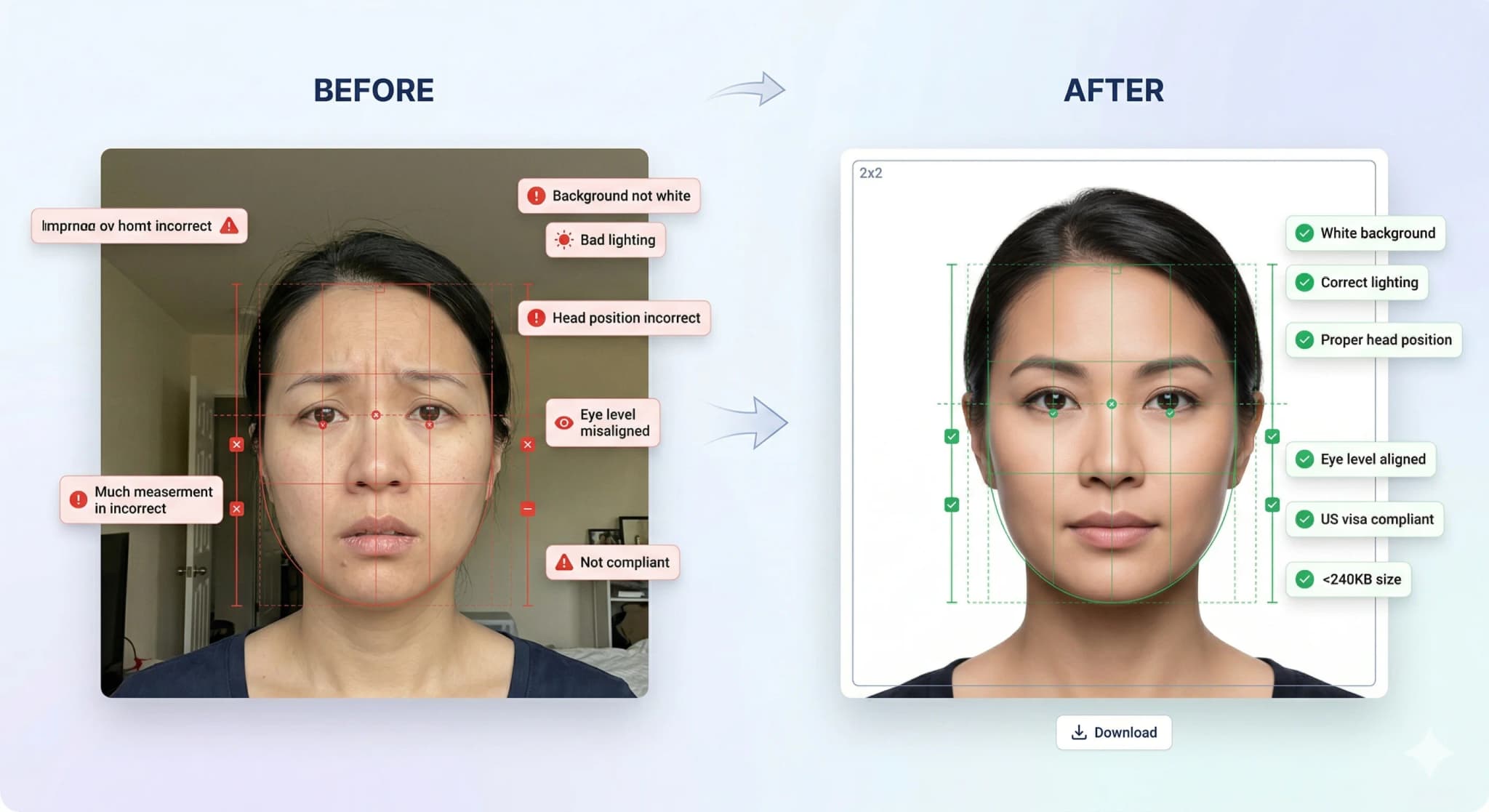
Our AI automatically corrects background, lighting, alignment, and sizing to meet strict government requirements.

Before and after AI correction: casual photo transformed into compliant visa photo

Background Removal

Pure white background

Head Straightening

Corrects tilt & rotation

Lighting Fix

Even, balanced exposure

Smart Crop

Perfect face positioning

Know What Gets Rejected

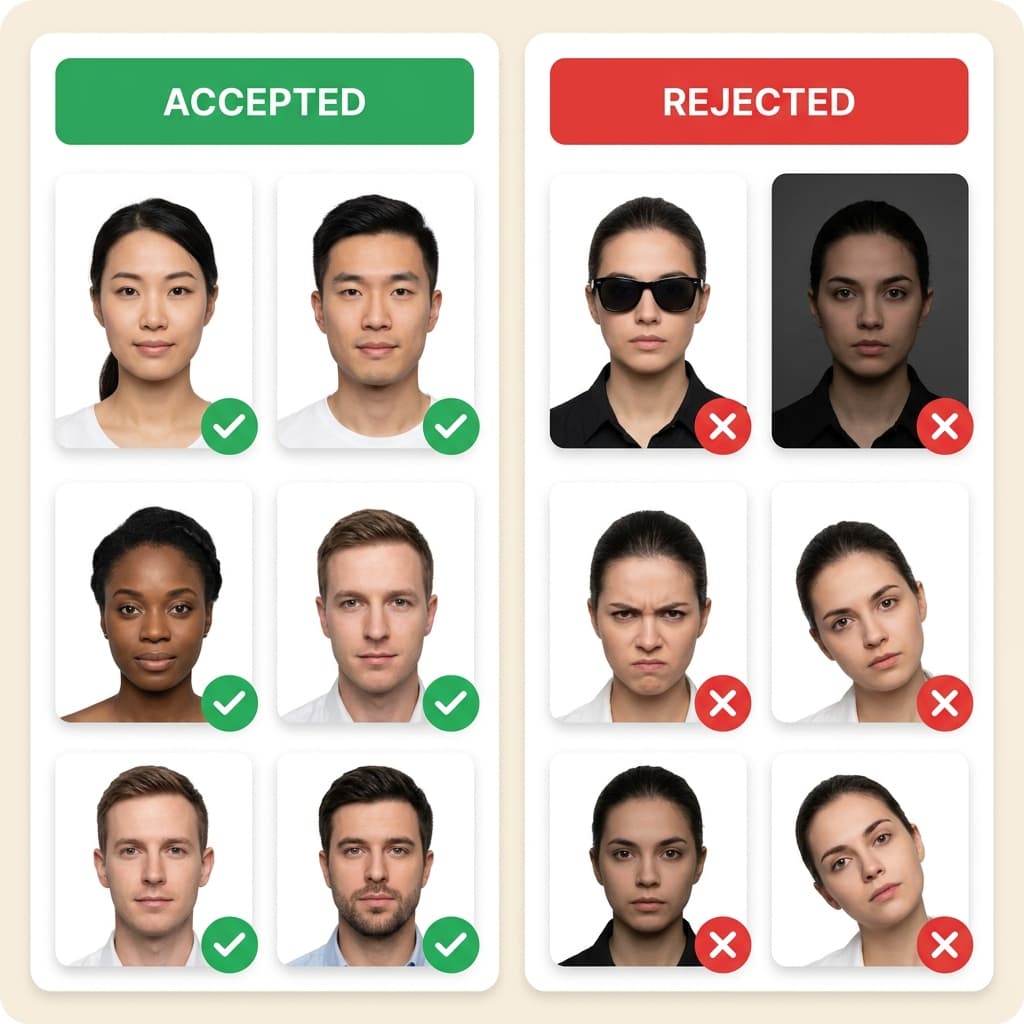
Accepted vs Rejected Photos

30% of visa applications are delayed due to non-compliant photos. Don't be one of them.

Examples of accepted and rejected visa photos showing common mistakes

Top Rejection Reasons

  • ✗ Wrong background color (not pure white)
  • ✗ Wearing eyeglasses or glare on lenses
  • ✗ Head tilted or turned off-center
  • ✗ Wrong photo millimeter dimensions

Our AI Guarantees

  • Pure white background every time
  • Auto head straightening & centering
  • Exact size per country specs
  • 14-point compliance check

...

Photos processed today

99.7%

Acceptance rate

< 30s

Average processing time

3.8/5

Trustpilot rating

Rated 3.8/5 on Trustpilot

Verified Customer Reviews

Real feedback from applicants using PhotoResizer.us for passport & visa photos.

Loved this one

“Loved this one”

Ambar Mishra

Germany (DE)

Apr 25, 2026

Relevant

“Clean, fast, and actually does what you need without over complicating things.”

Saurav Ydv

Nepal (NP)

Apr 24, 2026

Explored various other but no one…

“Explored various other but no one showing me exact issues and then i found this really helpful.”

Abhishek Srivastava

India (IN)

Apr 18, 2026

Very useful tool

“Very useful tool. My visa got approved.”

Zeno

India (IN)

Apr 17, 2026
State Dept. Compliant
ICAO Standard
256-bit SSL Encrypted
Auto-Deleted in 24hrs
Used by 500K+ Users
Money-Back Guarantee

Ready to Get Your Compliant Photo?

Join 500,000+ users who got their visa photos right the first time. It takes less than 30 seconds.

Official photo requirements

The K-1 fiancé visa allows the foreign-citizen fiancé of a US citizen to enter the United States for the purpose of marriage. After the I-129F petition is approved by USCIS, you must complete the DS-160 form at the National Visa Center (NVC) — which requires a strictly compliant digital photo. The K-1 photo follows the same DS-160 specifications as all US nonimmigrant visas: 600×600 pixels, under 240KB, sRGB JPEG, white background. Our VisaCompliance Studio ensures your K-1 photo passes the CEAC biometric scanner on the first upload.

K-1 Fiancé Visa Photo Specifications

ParameterRequirement
Dimensions600x600 px (2x2 inches / 51x51mm)
File size10KB – 240KB (JPEG format)
BackgroundPlain white background (no shadows)
Head height50–69% of total image height

K-1 Fiancé Visa Photo: What Makes It Different?

While the photo specifications are identical to other DS-160 visas, K-1 applicants face unique pressure: the I-129F petition process already takes 8–14 months, and a photo-related delay at the NVC stage can add weeks. Many K-1 applicants are photographing for the first time for a US visa and are unfamiliar with the strict 600×600px square crop, 240KB limit, and sRGB color requirements. Our tool eliminates this risk entirely — upload any photo and get a guaranteed-compliant result in seconds.

USCIS photo requirements for your immigration forms.

Who uses this tool

  • K-1 fiancé visa applicants after I-129F approval.
  • K-2 dependent children of K-1 visa holders.
  • Couples preparing for NVC processing and consulate interview.

Step-by-step guide

  1. Prepare your photo. Use a plain background and even lighting. No filters or editing.
  2. Upload above. The tool is pre-set with the correct dimensions for this visa type.
  3. Download and check. Verify file size and dimensions.
  4. Submit. Upload the compliant photo to the visa application portal.

Related tools

Authoritative US Visa Industry Guides

Frequently Asked Questions

What are the photo requirements for K-1 Fiancé Visa Photo Requirements & Maker?
The exact dimensions and file size limits are listed in the requirements table above. Always verify with the consulate or visa application centre for the most current requirements.
Can I resize my visa photo at home?
Yes. Use this tool to resize your photo to the exact specifications required by the visa application portal. Process everything in your browser — no uploads to external servers.
What background colour is needed for visa photos?
Most visa applications require a white or light-coloured background. Check the specific requirements table above for your visa type.
Can I wear glasses in my visa photo?
For most countries, including the US, glasses are strictly prohibited in visa or passport photos. Even if you wear them daily, you must remove them to avoid glare and ensure your eyes are completely visible.
Can I take my visa photo with a smartphone?
Yes! Modern smartphones have excellent cameras. Use the back camera, stand about 3-4 feet away against a plain wall, face a window for natural light, and have someone else take the picture. Then, use our AI tool to check compliance and crop it to the correct size.
What clothing should I wear for my photo?
Wear normal daily clothing. Do not wear uniforms (unless it is religious clothing worn daily). It is highly recommended to wear a dark or bright colour so you don't blend into the plain white background.
How recent does my photo need to be?
Your photo must have been taken within the last 6 months to reflect your current appearance. Using an old photo from a previous passport or visa will cause your application to be rejected.