Live: 113,488 compliant photos processed

Initializing AI Studio...

Simple 3-Step Process

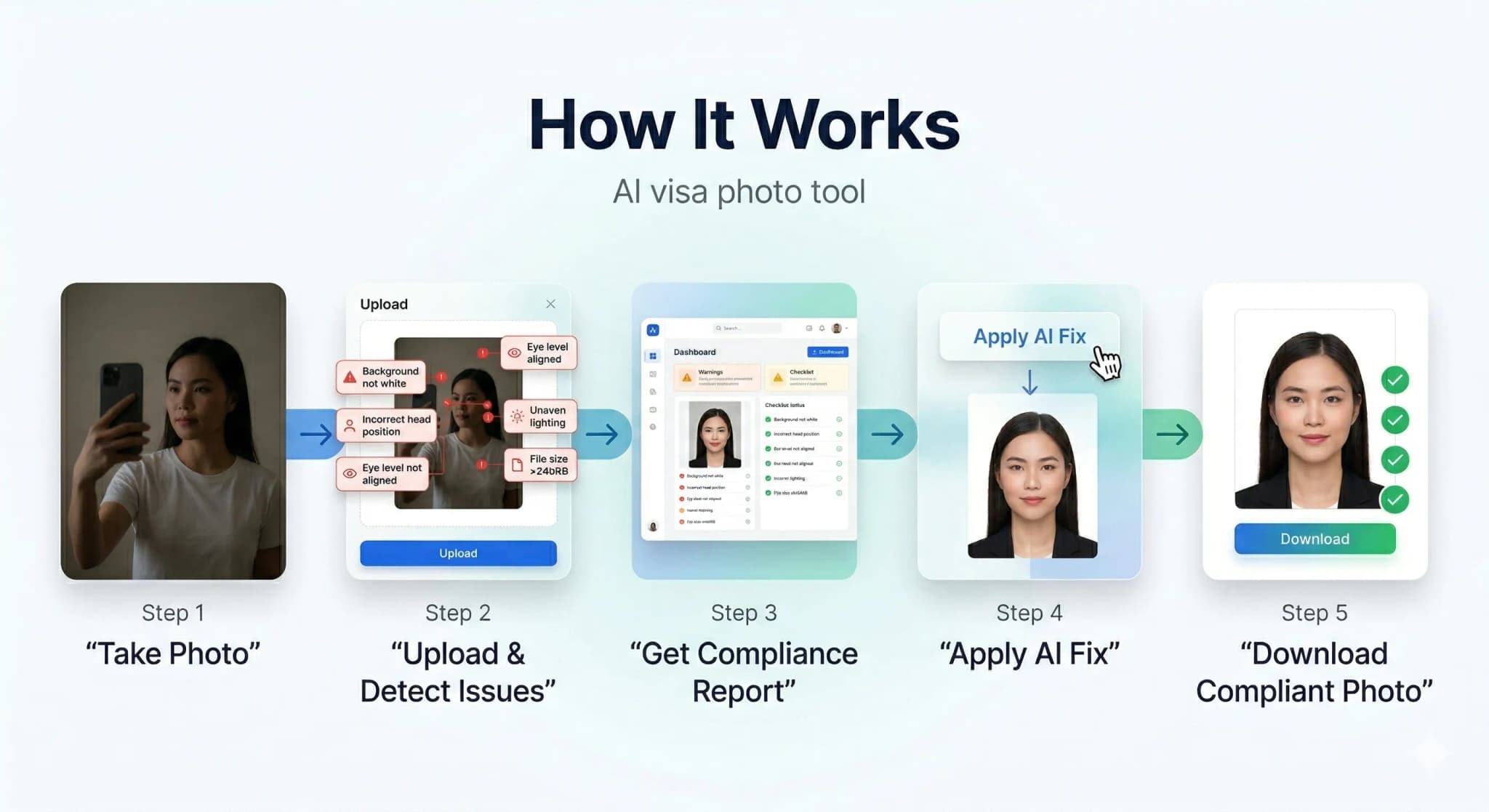
How It Works

Get your compliant visa photo in under 30 seconds. No studio visit needed.

How PhotoResizer works: 1) Take Photo 2) AI Fixes 3) Download
1

Upload or Snap

Upload any photo or use your camera. Our AI works with selfies, casual shots — anything.

2

AI Auto-Correction

Background removal, face centering, lighting fix, size compliance — all done by AI in seconds.

3

Download & Submit

Get your compliant photo instantly. Digital + print-ready formats available.

AI-Powered Results

See the AI Difference

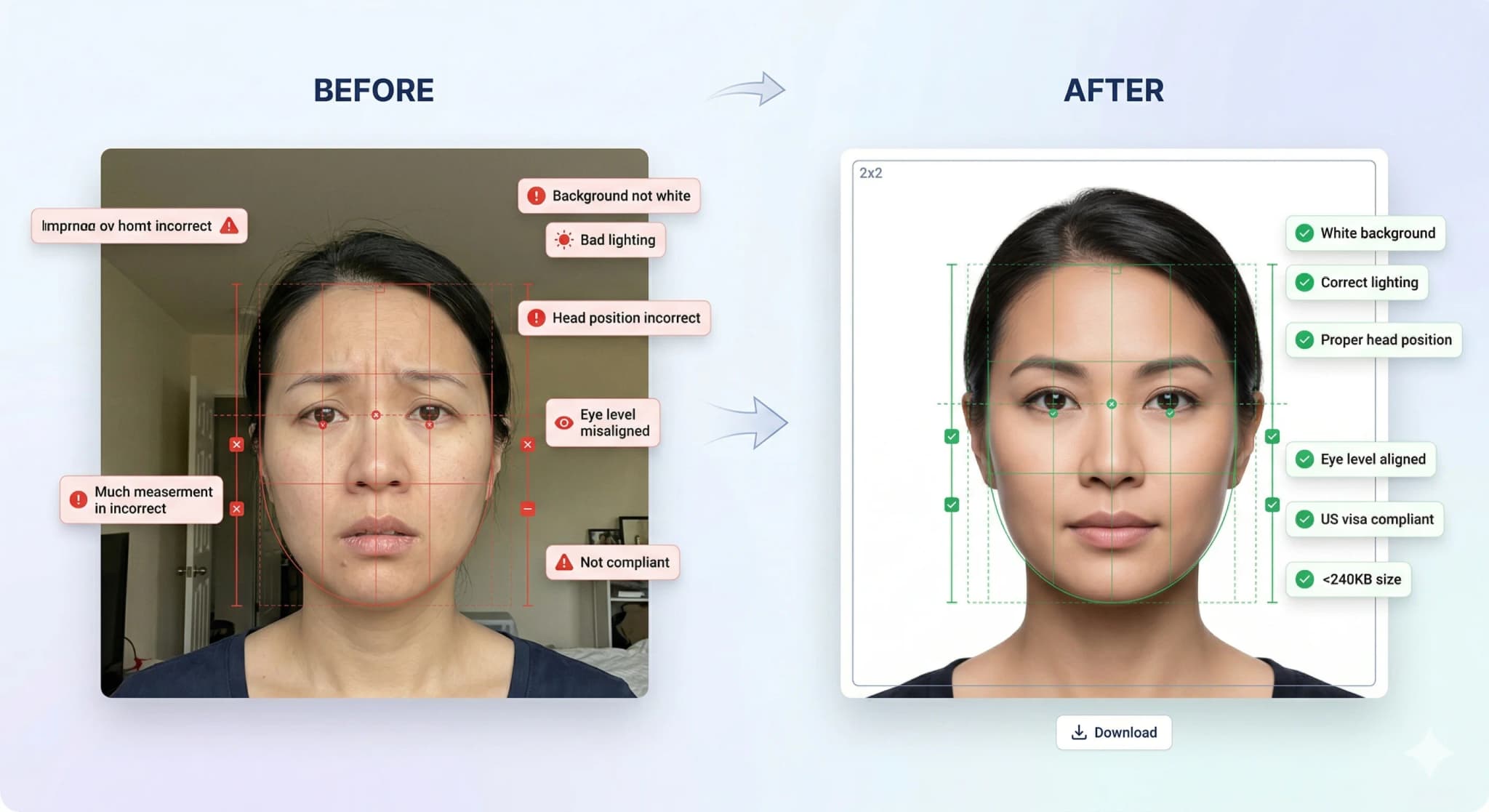
Our AI automatically corrects background, lighting, alignment, and sizing to meet strict government requirements.

Before and after AI correction: casual photo transformed into compliant visa photo

Background Removal

Pure white background

Head Straightening

Corrects tilt & rotation

Lighting Fix

Even, balanced exposure

Smart Crop

Perfect face positioning

Know What Gets Rejected

Accepted vs Rejected Photos

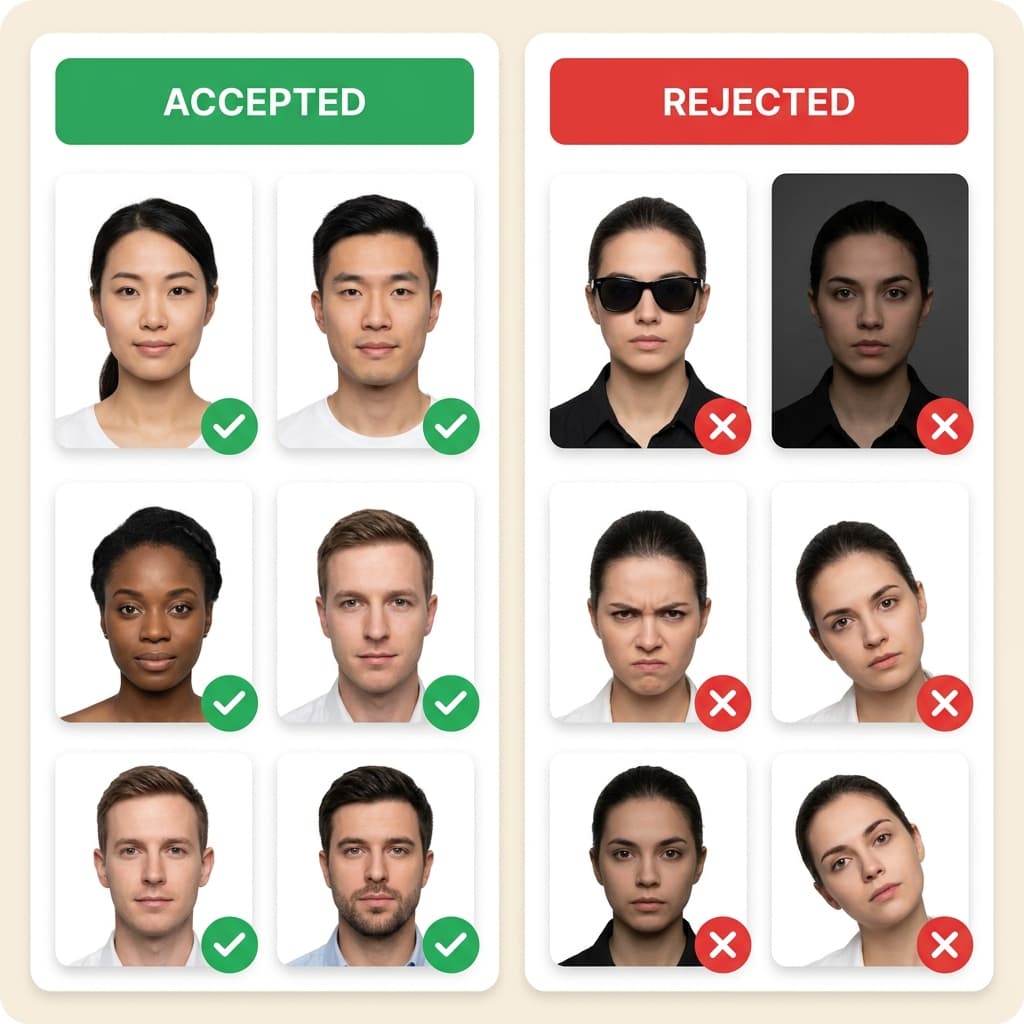
30% of visa applications are delayed due to non-compliant photos. Don't be one of them.

Examples of accepted and rejected visa photos showing common mistakes

Top Rejection Reasons

  • Wrong background color (not white)
  • Wearing glasses or sunglasses
  • Head tilted or turned
  • Wrong photo size or aspect ratio

Our AI Guarantees

  • Pure white background every time
  • Auto head straightening & centering
  • Exact size per country specs
  • 10-point compliance check

...

Photos processed today

99.7%

Acceptance rate

< 30s

Average processing time

4.8/5

Customer rating

Customer Reviews

Trusted by Thousands

Used this for my DS-160 application. Photo was accepted first try! Much cheaper than going to Walgreens.

Sarah M.

US Passport

2 days ago

The AI fixed my background and lighting perfectly. Saved me a trip to the photo studio during busy season.

Raj P.

UK Visa

1 week ago

I was worried about the strict requirements but this tool handled everything. Got my visa approved!

Emily C.

Schengen Visa

3 days ago

Quick and easy. The compliance report gave me confidence that my photo would be accepted.

David K.

Canada PR

5 days ago
State Dept. Compliant
ICAO Standard
256-bit SSL Encrypted
Auto-Deleted in 24hrs
Used by 500K+ Users
Money-Back Guarantee

Ready to Get Your Compliant Photo?

Join 500,000+ users who got their visa photos right the first time. It takes less than 30 seconds.

Official photo requirements

According to the U.S. Department of State, your passport photo must be exactly 2x2 inches (600x600 px digitally), have a plain white background, a neutral expression, and no glasses. Most people fail because of small mistakes like incorrect head size (must be 50-69%), shadows, or low resolution. PhotoResizer.us automatically checks and fixes all these requirements. While official tools just crop, we ensure full 100% compliance.

US Passport Photo Requirements (State Department)

ParameterRequirement
Dimensions2 × 2 inches (600 × 600 px)
File size10KB – 240KB (JPEG)
BackgroundPlain white
Head height1–1⅜ inches from chin to top of head
RecencyTaken within last 6 months

Getting your passport accepted the first time saves you weeks of delays and costly resubmission fees. Common errors like "Illumination Error" or improper dimension scaling cause instant rejection. Our VisaCompliance Studio acts as an insurance policy for your application, certifying every pixel before you submit.

Who uses this tool

  • US citizens applying for a new passport or renewal online.
  • Green card holders needing a compliant passport-style photo.
  • Applicants submitting DS-11 or DS-82 forms digitally.

Step-by-step guide

  1. Take a quality photo. Use natural daylight. Ensure the background matches the country requirement (usually white).
  2. Upload your photo above. The tool is pre-configured with the correct dimensions for this country.
  3. Download and verify. Check the file size and dimensions match the official requirements.
  4. Submit to the portal. Upload the resized photo to the official application system.

Related tools

Authoritative US Visa & Passport Guides

Frequently Asked Questions

What size photo do I need for a USA Passport Photo Check &?
The exact requirements are shown in the table above. Always verify with the official government portal, as requirements can change between application cycles.
Is it safe to resize passport photos online?
Yes. PhotoResizer.us processes images in your browser and does not permanently store them. Your photos remain private and under your control.
Can I use a phone selfie for my passport photo?
You can, as long as the photo meets the official requirements for background colour, head position, lighting, and resolution. Use this tool to resize and compress it to the correct dimensions.