Live: 113,488 compliant photos processed
State Dept. Compliant

Meets all official U.S. State Department photo standards

Prevents 221(g) Delays

Avoids common administrative processing photo failures

CEAC-Ready Format

Guaranteed to pass the DS-160 online upload tool

Initializing AI Studio...

Simple 3-Step Process

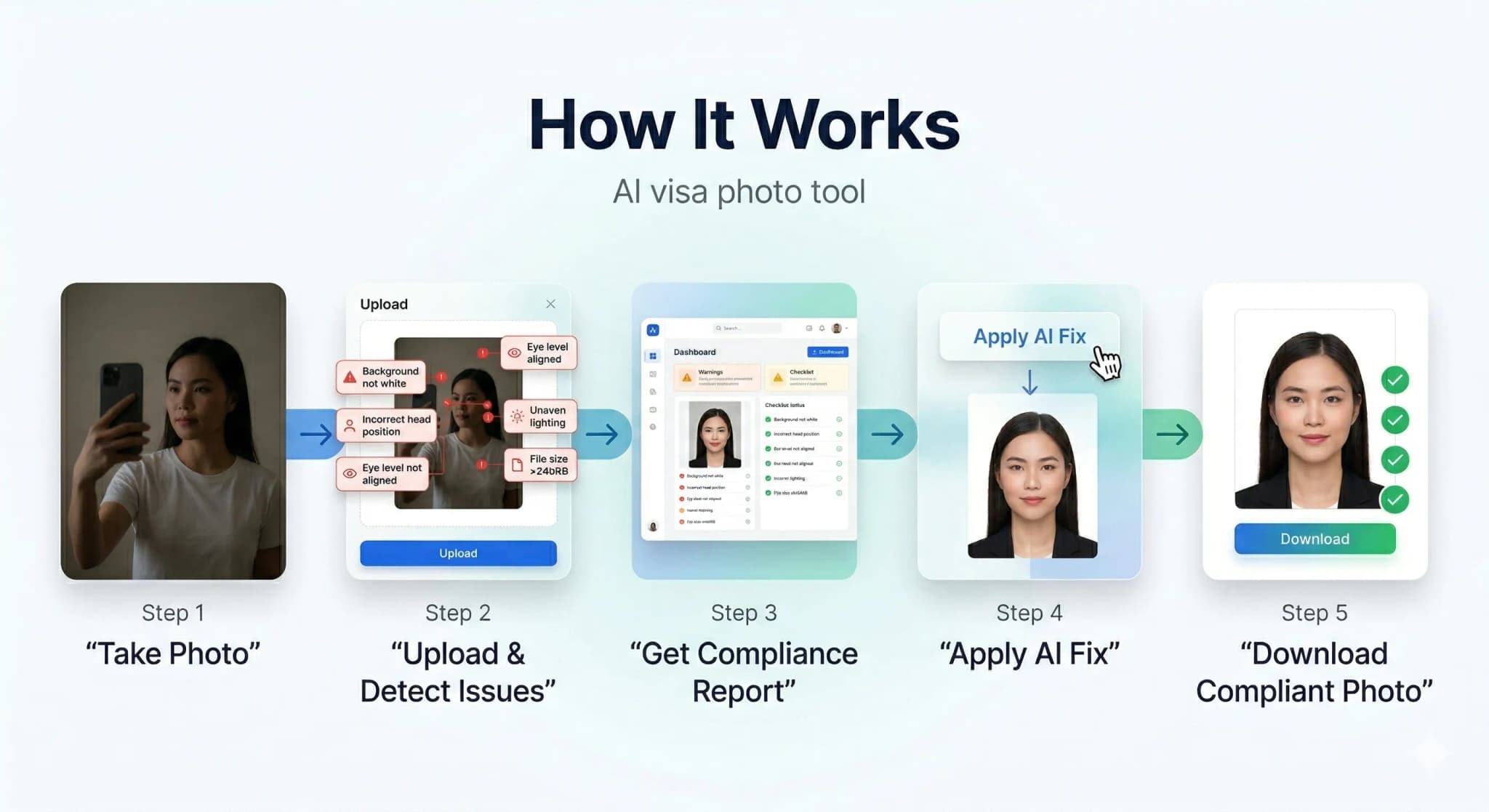
How It Works

Get your compliant visa photo in under 30 seconds. No studio visit needed.

How PhotoResizer works: 1) Take Photo 2) AI Fixes 3) Download
1

Upload or Snap

Upload any photo or use your camera. Our AI works with selfies, casual shots — anything.

2

AI Auto-Correction

Background removal, face centering, lighting fix, size compliance — all done by AI in seconds.

3

Download & Submit

Get your compliant photo instantly. Digital + print-ready formats available.

AI-Powered Results

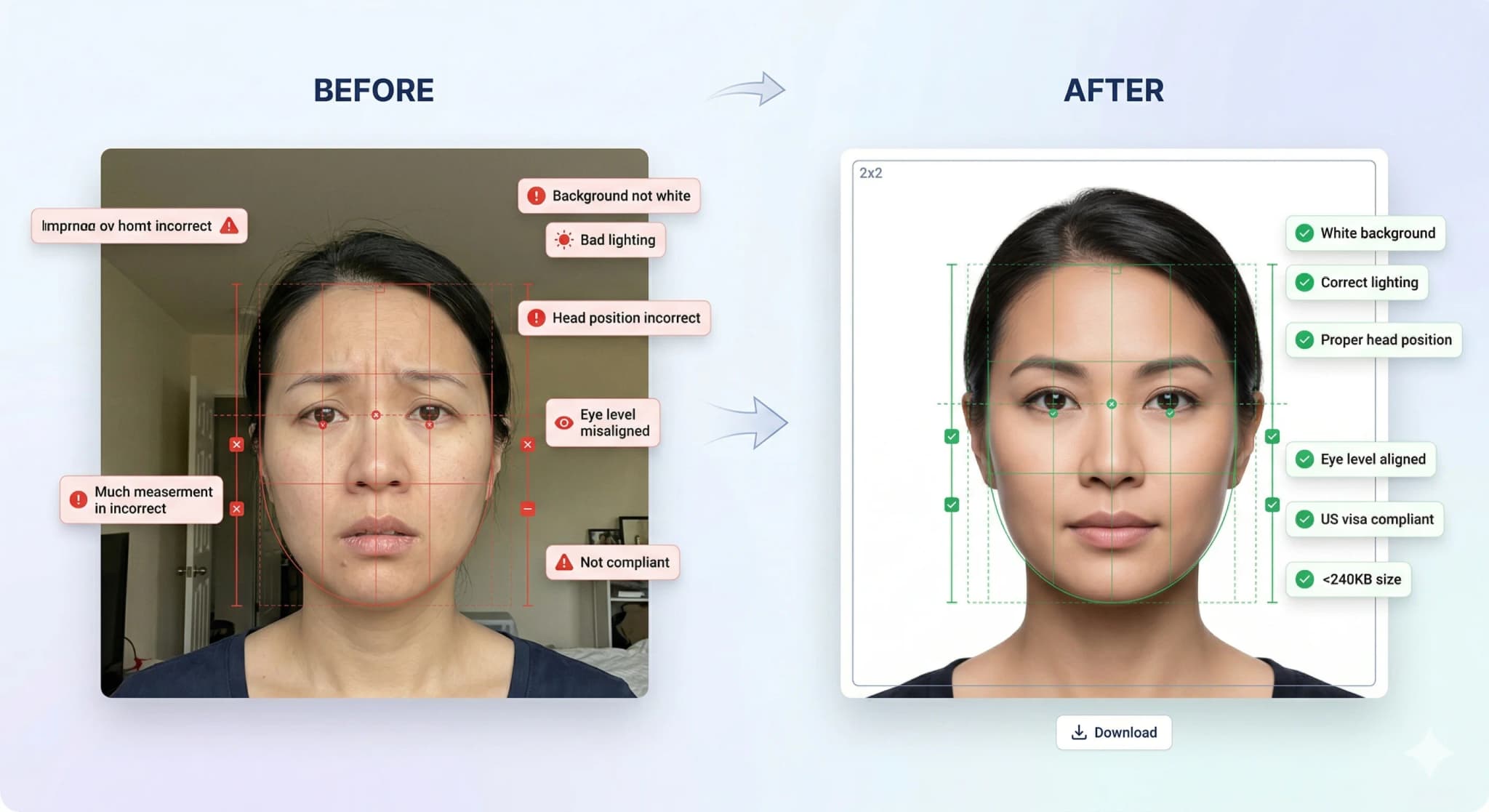
See the AI Difference

Our AI automatically corrects background, lighting, alignment, and sizing to meet strict government requirements.

Before and after AI correction: casual photo transformed into compliant visa photo

Background Removal

Pure white background

Head Straightening

Corrects tilt & rotation

Lighting Fix

Even, balanced exposure

Smart Crop

Perfect face positioning

Know What Gets Rejected

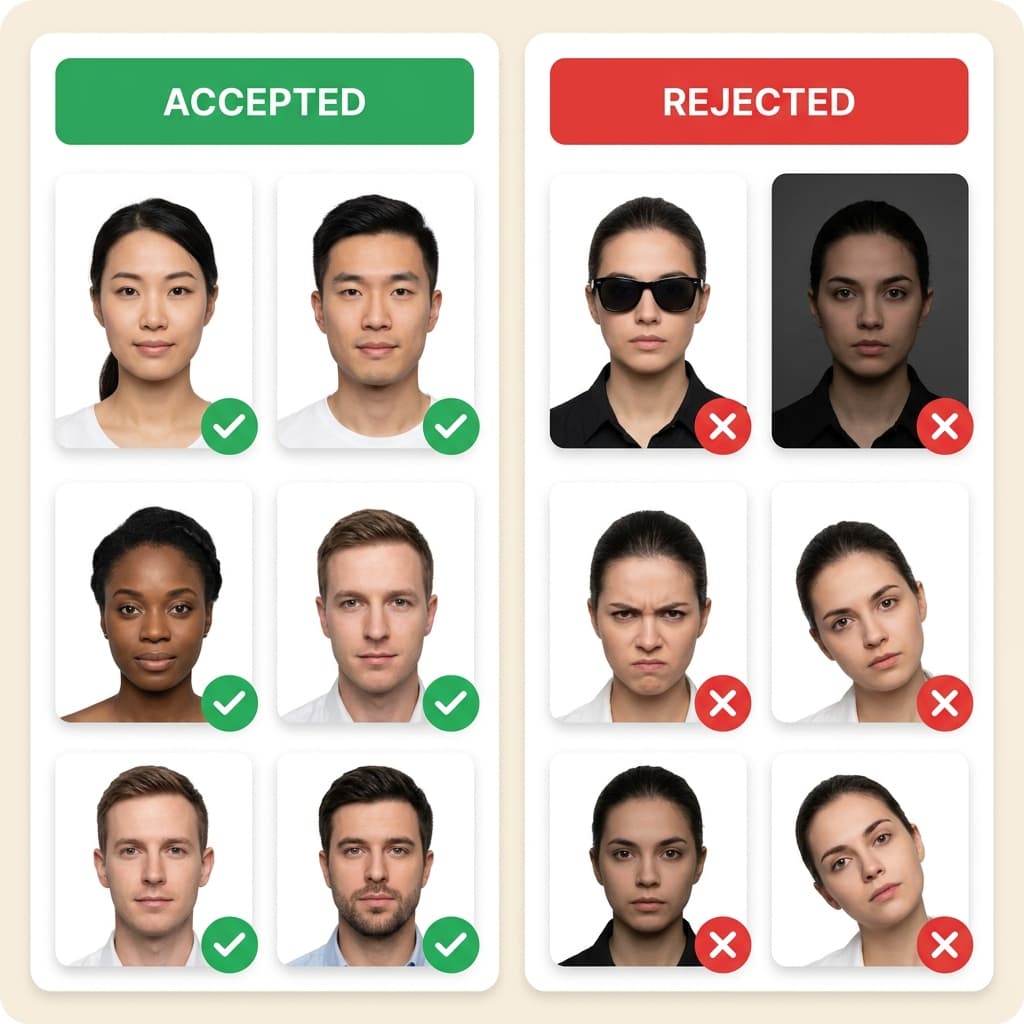
Accepted vs Rejected Photos

30% of visa applications are delayed due to non-compliant photos. Don't be one of them.

Examples of accepted and rejected visa photos showing common mistakes

Top Rejection Reasons

  • Wrong background color (not white)
  • Wearing glasses or sunglasses
  • Head tilted or turned
  • Wrong photo size or aspect ratio

Our AI Guarantees

  • Pure white background every time
  • Auto head straightening & centering
  • Exact size per country specs
  • 10-point compliance check

...

Photos processed today

99.7%

Acceptance rate

< 30s

Average processing time

4.8/5

Customer rating

Customer Reviews

Trusted by Thousands

Used this for my DS-160 application. Photo was accepted first try! Much cheaper than going to Walgreens.

Sarah M.

US Passport

2 days ago

The AI fixed my background and lighting perfectly. Saved me a trip to the photo studio during busy season.

Raj P.

UK Visa

1 week ago

I was worried about the strict requirements but this tool handled everything. Got my visa approved!

Emily C.

Schengen Visa

3 days ago

Quick and easy. The compliance report gave me confidence that my photo would be accepted.

David K.

Canada PR

5 days ago
State Dept. Compliant
ICAO Standard
256-bit SSL Encrypted
Auto-Deleted in 24hrs
Used by 500K+ Users
Money-Back Guarantee

Ready to Get Your Compliant Photo?

Join 500,000+ users who got their visa photos right the first time. It takes less than 30 seconds.

Official photo requirements

Applying for an H-1B, H-4 dependent, L-1, or O-1 work visa requires a pristine digital photo. H-4 dependent visa holders (spouses and children of H-1B workers) must submit the same DS-160 photo as the primary applicant. Our VisaCompliance Studio checks your work visa photo specifications against US standards to guarantee CEAC portal acceptance.

H1B / H-4 / Work Visa Photo Specifications

ParameterRequirement
Dimensions600x600 pixels (Square)
ColorColor photo (sRGB)
BackgroundUniform white background
ExpressionNeutral facial expression

H-4 Dependent Visa Photo Requirements

If you are applying for an H-4 dependent visa as the spouse or child of an H-1B worker, your photo requirements are identical to the H-1B primary applicant. You must submit a 600×600 pixel JPEG under 240KB with a plain white background through the DS-160 form. Each family member — including children of any age — needs their own compliant photo. Our tool processes H-4 photos to the exact same standard as H-1B, ensuring your entire family's application is accepted together without delays.

USCIS photo requirements for your immigration forms.

Who uses this tool

  • H1B, L1, O1 Work Visa applicants.
  • H-4 dependent visa applicants (spouse and children of H-1B holders).
  • Professionals moving to the USA.
  • Applicants checking work visa photo format.

Step-by-step guide

  1. Prepare your photo. Use a plain background and even lighting. No filters or editing.
  2. Upload above. The tool is pre-set with the correct dimensions for this visa type.
  3. Download and check. Verify file size and dimensions.
  4. Submit. Upload the compliant photo to the visa application portal.

Related tools

Authoritative US Visa Industry Guides

Frequently Asked Questions

What are the photo requirements for US H1B, H-4 Dependent & Work Visa Photo Editor?
The exact dimensions and file size limits are listed in the requirements table above. Always verify with the consulate or visa application centre for the most current requirements.
Can I resize my visa photo at home?
Yes. Use this tool to resize your photo to the exact specifications required by the visa application portal. Process everything in your browser — no uploads to external servers.
What background colour is needed for visa photos?
Most visa applications require a white or light-coloured background. Check the specific requirements table above for your visa type.
Can I wear glasses in my visa photo?
For most countries, including the US, glasses are strictly prohibited in visa or passport photos. Even if you wear them daily, you must remove them to avoid glare and ensure your eyes are completely visible.
Can I take my visa photo with a smartphone?
Yes! Modern smartphones have excellent cameras. Use the back camera, stand about 3-4 feet away against a plain wall, face a window for natural light, and have someone else take the picture. Then, use our AI tool to check compliance and crop it to the correct size.
What clothing should I wear for my photo?
Wear normal daily clothing. Do not wear uniforms (unless it is religious clothing worn daily). It is highly recommended to wear a dark or bright colour so you don't blend into the plain white background.
How recent does my photo need to be?
Your photo must have been taken within the last 6 months to reflect your current appearance. Using an old photo from a previous passport or visa will cause your application to be rejected.